GA4 gives you the data, but its own reports only go so far. The tools below fill the gaps: building dashboards, moving data where you report on it, checking what your tags send, and seeing patterns that tables hide. Every one has a free version you can use with your own property today.
Two of them, Seasonal Spiral and Timing Grid, are ours and marked (ours). They’re listed first, then Google’s Data Studio, then third-party tools. Nobody paid to be included.
How we chose them
Each tool had to be a separate tool rather than a feature inside GA4 or Tag Manager, work with GA4 directly, have a free version that does real work rather than a time-limited trial, and do something GA4’s own reports don’t. We checked every tool’s free plan on its own site in October 2026. Free plans change, so check before you build a process around one.
1. Seasonal Spiral (ours)
- Best for: seeing weekly rhythm and year-on-year change in daily GA4 or Search Console data.
- Free plan: the spiral itself, with sample data to try first. Pro adds saved views.
- Worth knowing: it shows patterns, not individual reports, so you’ll still want GA4 or Data Studio for the detail.
Seasonal Spiral winds daily data into a spiral, one turn per year. Because the same date sits in the same place on every turn, a weekly cycle shows up as a regular ripple and a seasonal peak lines up year after year. Your data goes from Google straight to your browser; it isn’t sent to us. There’s more on how it works in our Seasonal Spiral post.
2. Timing Grid (ours)
- Best for: finding the hours and days your traffic, conversions or revenue peak.
- Free plan: the heatmap itself, with sample data before you connect anything. Pro adds saved views.
- Worth knowing: GA4 only, and a fixed set of metrics: sessions, users, page views, conversions, revenue or a single event.
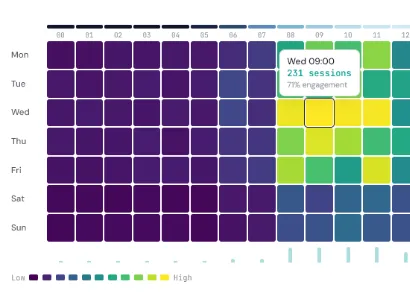
Timing Grid lays a GA4 property out as a 7-day by 24-hour heatmap, which is useful for ad scheduling, email send times and staffing. You can build the same view in GA4 Explore; we’ve written up how to do it, and the two traps that make it misleading. See the Timing Grid post for examples.
If you want something to keep watch, GA4 Tracking Health checks every day that your key GA4 events are still being recorded. It’s part of Tools Pro, so it’s paid.
3. Data Studio
- Best for: dashboards and reports that update themselves and can be shared with people who don’t use GA4.
- Free plan: free, with a native GA4 connector.
- Worth knowing: busy reports can hit GA4’s API quotas, which shows up as charts that fail to load.
Data Studio is Google’s free reporting tool, and the usual home for a client or board dashboard. It blends GA4 with Google Ads, Search Console and Sheets easily. Blending anything else, or handling large data sets, is where it starts to struggle, and that’s where connector tools like Windsor.ai come in.
4. Analytics Debugger
- Best for: debugging GA4 alongside the other tags on a page.
- Free plan: the browser extension is free.
- Worth knowing: it’s a debugging tool for people comfortable reading raw hits.
Analytics Debugger is a free browser extension from David Vallejo that shows GA4 hits, and those from 20 or so other analytics and ad vendors, in real time. Google’s Tag Assistant only shows Google tags; this shows everything a page sends in one place, which helps when the problem is a clash between tools.
5. Windsor.ai
- Best for: getting one GA4 property into Data Studio, Sheets or a warehouse on a schedule.
- Free plan: after a 30-day trial, a free plan with 1 user, 1 data source and 1 account.
- Worth knowing: one data source on the free plan; paid plans start at $19 a month.
Windsor.ai is a connector tool: it pulls data out of GA4 and other platforms and delivers it where you build reports. The free plan is enough to route one GA4 property, and the trial lets you test the rest before deciding.
6. Databox
- Best for: a quick KPI dashboard without building one from scratch.
- Free plan: free forever, with 1 user and 3 data sources.
- Worth knowing: sharing, automation and more sources are on paid plans, from $71 a month billed annually.
Databox connects to GA4 and turns it into ready-made dashboards and performance summaries. Three data sources on the free plan is enough for GA4, Search Console and one ad platform, which covers a lot of small-business reporting.
If you outgrow the free tools
Before adding any tool, it’s worth using what GA4 and Tag Manager already include: Explore for funnels and paths, and Tag Assistant for checking tags before you publish. Data Studio on top of those covers a great deal. The time to pay is when you’re blending many sources, or reporting on many properties. Supermetrics starts at €39 a month billed yearly, and Power My Analytics’ free option uses sample data only, with paid plans after a 14-day trial.
If your GA4 data doesn’t look right in any of these, the problem is usually the setup rather than the tool. We audit GA4 properties, so get in touch if you’d like a second pair of eyes on yours.