Maintain Measurement Accuracy While Respecting User Privacy Choices
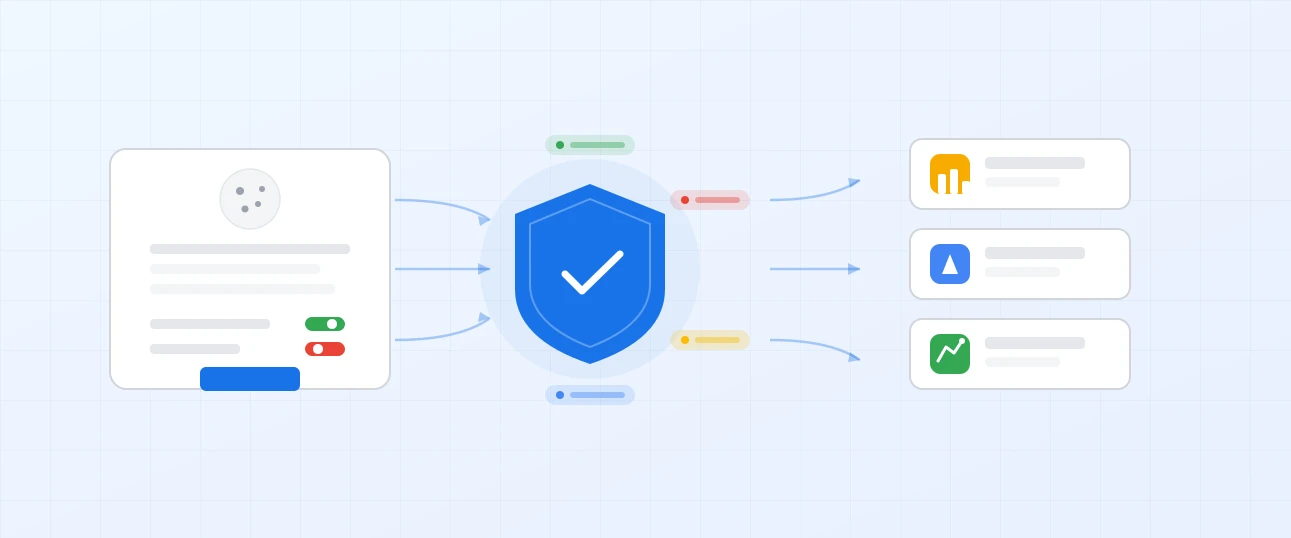
Google Consent Mode is the bridge between privacy compliance and accurate analytics. It adjusts how Google tags behave based on your visitors' consent choices, ensuring you stay compliant while recovering measurement data that would otherwise be lost.
DATA HIT implements Consent Mode properly, connecting your consent management platform to Google's tags so your analytics and advertising data remains as complete as possible, without compromising on privacy.
The Problem: Consent Requirements Are Creating Data Gaps
Privacy regulations like GDPR and PECR require you to obtain user consent before setting cookies or collecting personal data. When visitors decline consent, your Google tags stop collecting data entirely. Depending on your consent rates, this can mean losing 20-40% or more of your analytics and conversion data.
The impact is significant. GA4 reports undercount traffic and conversions. Google Ads receives fewer conversion signals, weakening automated bidding and audience building. Marketing decisions are based on an increasingly incomplete picture.
The Solution: Privacy-Compliant Measurement with Google Consent Mode
Consent Mode is Google's framework for adjusting tag behaviour based on user consent status. When a visitor grants consent, tags operate normally. When consent is denied, tags send cookieless pings instead, which Google uses to model the missing data.
This means GA4 and Google Ads can estimate the conversions and traffic you're not directly measuring, filling the gaps left by consent refusals without violating privacy regulations.
How Consent Mode Works
Consent Mode communicates your visitors' consent choices to Google tags through two key consent types.
analytics_storage
Controls whether analytics cookies (used by GA4) can be set. When denied, GA4 sends cookieless pings that enable behavioural modelling without storing cookies on the visitor's device.
ad_storage
Controls whether advertising cookies (used by Google Ads, Floodlight, etc.) can be set. When denied, conversion pings are sent without cookie identifiers, enabling conversion modelling.
ad_user_data
Controls whether user data can be sent to Google for advertising purposes. Required for features like Enhanced Conversions and Customer Match.
ad_personalization
Controls whether personalised advertising is enabled. When denied, remarketing and personalised ads are restricted for that user.
These consent signals are passed from your consent management platform to Google Tag Manager, which adjusts tag behaviour automatically. No manual logic required once it's configured correctly.
Consent Mode v2
Google introduced Consent Mode v2 in late 2023, adding the ad_user_data and ad_personalization parameters. As of March 2024, Consent Mode v2 is required for sending data to Google from users in the European Economic Area. Without it, your Google Ads conversion tracking and audience features will not function for EEA users.
If your implementation still uses the original Consent Mode parameters only, it needs updating.
Basic vs Advanced Consent Mode
Basic Consent Mode
Tags are blocked entirely when consent is denied. No pings are sent, no modelling occurs. You stay compliant but lose all measurement data from users who decline.
Advanced Consent Mode
Tags send cookieless pings when consent is denied. These pings contain no personal identifiers but allow Google to model conversions and behaviour statistically. You stay compliant and recover a portion of the lost data through modelling.
For most businesses, Advanced Consent Mode is the recommended approach. It maximises measurement accuracy while fully respecting consent choices.
What I Can Help With
Consent Mode implementation involves connecting several systems correctly. I can help with:
- Initial setup of Consent Mode within Google Tag Manager, including default and update commands
- CMP integration with platforms like Cookiebot, CookieYes, OneTrust, and Iubenda
- Consent Mode v2 upgrades for existing implementations that need the additional parameters
- Testing and validation to confirm consent signals are being passed correctly to all Google tags
- Troubleshooting when Consent Mode isn't behaving as expected or modelling isn't appearing in reports
- Documentation of your consent configuration so your team understands the setup
Benefits
Recover Lost Conversion Data
Google uses the cookieless pings from Advanced Consent Mode to model conversions that weren't directly measured. This means your GA4 and Google Ads reports reflect a more accurate picture of actual performance.
Maintain Google Ads Effectiveness
Consent Mode v2 is required for EEA users. Without it, conversion data stops flowing to Google Ads, degrading Smart Bidding performance and audience building. Proper implementation keeps your campaigns optimised.
Stay Privacy Compliant
Consent Mode respects user choices. When consent is denied, no cookies are set and no personal data is collected. The cookieless pings sent in Advanced mode contain no identifiable information.
Works With Your Existing CMP
Consent Mode integrates with all major consent management platforms. If you already have a cookie banner in place, Consent Mode connects to it rather than replacing it.
Part of the Bigger Picture
Consent Mode is one component of a privacy-compliant tracking setup. It typically works alongside:
Getting the best results often means implementing Consent Mode as part of a wider tracking and privacy project rather than in isolation.
Frequently Asked Questions
Is Consent Mode required?
Consent Mode v2 is required if you want to send data to Google from users in the European Economic Area. Without it, Google Ads conversion tracking, remarketing, and Customer Match will not work for EEA users. For GA4, it's not strictly required but is strongly recommended to enable behavioural and conversion modelling.
Does Consent Mode replace my cookie banner?
No. Consent Mode works alongside your existing consent management platform. Your CMP handles the user-facing banner and consent collection. Consent Mode is the technical layer that communicates those choices to Google tags.
Will I see modelled data in my reports?
Yes, provided you have sufficient traffic. Google requires a minimum volume of consent signals and cookieless pings before modelling activates. For most sites with reasonable traffic, modelling appears within a few weeks of implementation.
Does Consent Mode work with server-side GTM?
Yes. Consent signals are forwarded from the client-side container to the server-side container. Server-side GTM can then apply consent-aware behaviour to tags running on the server, giving you both the privacy compliance of Consent Mode and the data recovery benefits of server-side tracking.
How do I know if my current setup is correct?
Common signs of misconfiguration include: Consent Mode showing as not detected in Google Ads, modelled conversions not appearing in GA4 despite sufficient traffic, or consent signals not updating when visitors interact with your cookie banner. I can audit your current setup and identify any issues.
What does implementation involve?
Implementation includes configuring Consent Mode defaults in GTM, integrating with your CMP, testing consent signal flow across all consent states, and validating that Google platforms are receiving the correct signals. Typical timelines are 1-2 weeks depending on the complexity of your existing setup.
Ready to Fix Your Consent Mode Setup?
Stop losing data unnecessarily. Book a discovery call to discuss how Consent Mode can improve your measurement accuracy while keeping you compliant.